Deal alert! Northwest will form your LLC for $39 (60% discount). See details.
 In this guide, we’ll walk you through filing your LLC Articles of Organization with the state to create your Arizona LLC.
The Articles of Organization is the document that, once approved by the Arizona Corporation Commission, creates your Arizona LLC.
You can file your Articles of Organization online or by mail.

(Arizona Secretary of State, Corporation Commission Building)
Arizona LLC filing fee & approval times
The Arizona LLC filing fee is $50.
Alternatively, you can pay $85 to get your LLC approved faster.
Note: The LLC filing fee is a one-time fee.
Mail filing (fees and approval time):
If you file your Articles of Organization by mail and pay $50, your LLC will be approved in 14-16 business days (plus mail time).
If you file your Articles of Organization by mail and pay $85 for expedited processing, your LLC will be approved in 3-5 business days (plus mail time).
Online filing (fees and approval time):
If you file your Articles of Organization online and pay $50, your LLC will be approved in 14-16 business days (plus mail time). You need to upload a signed Statutory Agent Acceptance form. If you don’t upload the form, the system won’t let you select a $50 filing fee at checkout. Instead, you’ll have to pay an additional $35 ($85 total) for expedited processing.
If you file your Articles of Organization online and pay $85 for expedited processing, your LLC can be approved in 1 business day. You shouldn’t upload a signed Statutory Agent Acceptance letter. Instead, your Statutory Agent will accept their position by clicking an email link sent from the AZCC. Therefore, as soon as the Statutory Agent clicks the acceptance link, your LLC will be approved.
Check out LLC Cost in Arizona for more info on the fees for starting an Arizona LLC.
Note: Filing times may take longer due to government delays. For the most up-to-date LLC processing times, check how long does it take to get an LLC in Arizona.
LLC University® recommendation
If you want your LLC approved as quickly as possible:
We recommend the online expedited filing ($85). The online filing requires less paperwork and you can get your LLC approved in 1 day.
If you only want to spend $50 and don’t care about approval time:
We recommend doing a “regular” filing (not an expedited filing). In this case, you can file the Articles of Organization online or by mail as they both have a 14-16 business days approval time. Technically, the mail filing will take a few days longer (to account for transit time). Remember that to do the regular filing online, you’ll need to complete and upload a Statutory Agent Acceptance form.
If you’d rather hire a company to file for you:
Check out Best LLC Services in Arizona for our advice on which company would be the best fit for your needs.
Need to save time? Hire a company to form your LLC:
Northwest ($39 + state fee) or LegalZoom ($149 + state fee)
(Learn why Northwest is #1 in Northwest vs LegalZoom)
Since we feel the online filing method (whether you pay $50 or $85) is better than the mail filing, this lesson and its instructions will focus on the online filing.
Having said that, we do include an overview of the mail filing below.
Arizona LLC Articles of Organization (Online)
Important: Arizona’s old filing system was called eCorp.
However, the Arizona Corporation Commission replaced their old online filing portal in January 2026.
The new online filing system is called Arizona Business Center.
In order to form an Arizona LLC online, you’ll need an account with the AZCC’s Arizona Business Center. If you don’t already have one, you can follow the steps below to create one.
How to Create an Arizona Business Center Account
Get Started: Go to the Arizona Business Center: Registration page.
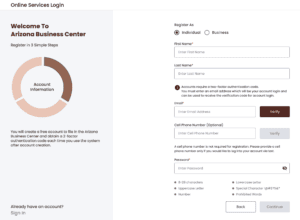
Account Information
- Select “Individual“.
- Enter your name and email.
- Verify your email address.
- Enter a password and click “Continue“.
Mailing Address
- Enter a street address. This address can be in any state, or in any country.
- Click “Continue“.
Account Preferences
2-Factor Authentication
The Arizona Business Center login requires two-factor authentication.
Choose whether you would like to receive your two-factor authentication by email or by text.
Contact Information in Case of Filing Errors
The Arizona Corporations Commission will also contact you if your filing is missing any documents or needs corrections.
Choose whether you would like for them to contact you about filing errors by email, text, or both.
Click “Register“.
Start Your Online Filing
Go to the Arizona Online Services Login page and log into your account.
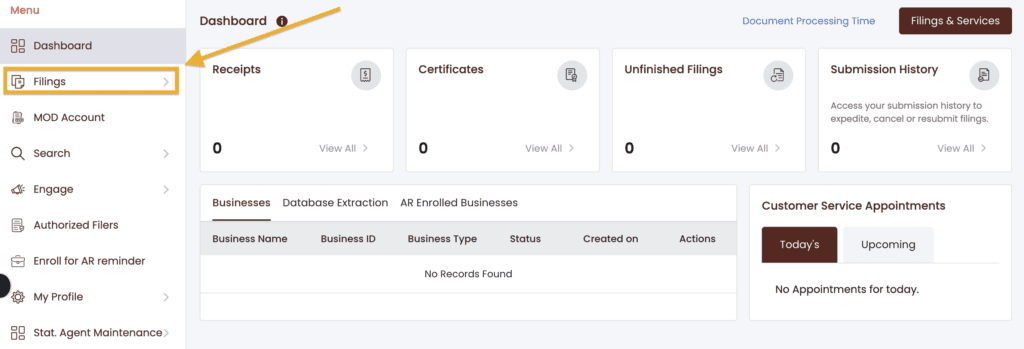
In your Dashboard, click “Filings“.
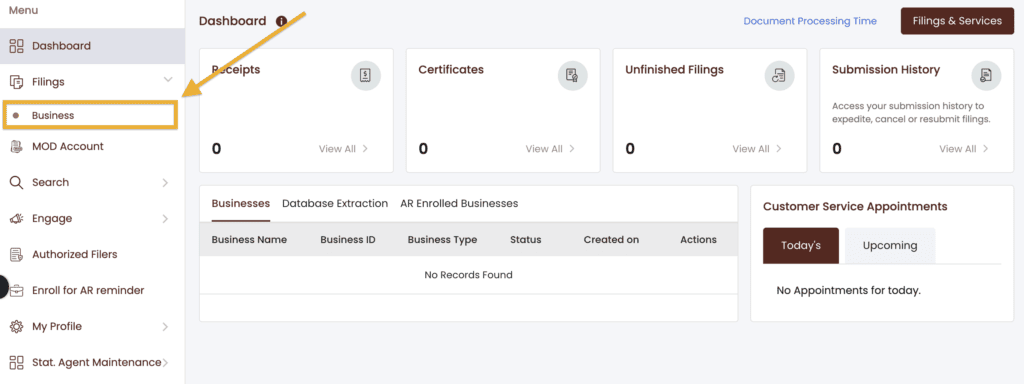
Then click “Business“.
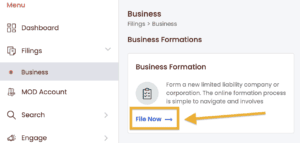
Under Business Formation, click “File Now“.
Business Type
Select “Domestic” and click “Next“.
Legal Structure
Select “Domestic Limited Liability Company” from the drop-down, and then select “Domestic Limited Liability Company” again.
Click “Next“.
Business Name
- Prior LLC University® lesson: Please read the Arizona LLC Name Search lesson before proceeding.
Note: You aren’t required to reserve an LLC Name in Arizona, and we don’t recommend it. It’s usually a waste of money.
Did you reserve a name for your business?
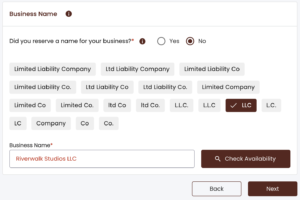
If you reserved an LLC Name:
- Click “Yes“.
- Then enter your email address and click “Get OTP” to retrieve your reserved name.
If you didn’t reserve an LLC Name:
- Click “No“.
- Choose the designator (ending) for your LLC. (Most people choose “LLC“.)
- Then enter your Business Name and click “Check Availability“.
If you see a message in green, then your desired business name is likely available. You can continue with your filing.
If you see a message in red, then your desired business name isn’t available. You’ll need to pick a new name for your LLC.
When you receive a message in green letting you know that your name is available, click “Next“.
Business Email Address
Enter your email address.
Date of Formation
This is your LLC’s Effective Date. The LLC Effective Date is the date your Arizona LLC officially goes into existence. Think of it as the date your LLC is “born”.
- If you leave the date as-is, your LLC will go into existence on today’s date.
- If you prefer for your LLC to go into existence in the future, you can enter a forward-date, but it can’t be more than 90 days ahead.
Tip: If you’re forming your Arizona LLC later in the year (October, November, December) and you don’t need your LLC open right away, you can give your LLC an effective date of January 1st of the following year. This will save you the hassle of filing taxes for those few months with no business activity.
Enter the date and time that you’d like for your LLC to go into effect.
Most people leave the default date and time as-is.
Period of Duration
Duration means how long your Arizona LLC will exist for. “Perpetual (forever)” means the LLC will remain open until the owner files paperwork to dissolve – shut down – the LLC (as opposed to having the LLC automatically shut down on a future date).
This section is set to “Perpetual” by default. You don’t need to do anything here.
Character of Business
This section is asking for the purpose of your LLC.
Enter a few words about your business industry. It can be as simple as “Restaurant” or “Daycare”.
A drop-down will appear. Choose the industry that best fits your primary business purpose.
It’s okay if it doesn’t match exactly. You won’t be held to this business purpose. The state just asks for this information for statistical purposes.
Click “Next“.
Principal Address
What is a Principal Address? A Principal Address is where the primary business activities take place and/or where your LLC records are kept.
Enter the address of your principal place of business.
The Principal Address can be a:
- home address,
- mailing address,
- office address, or
- the address of your Statutory Agent
This address can be in any state, or in any country.
Address privacy: If you are concerned about your address being listed on public records, please see our Arizona Statutory Agent lesson for some work-arounds.
If you’d like to receive state notices at a different address than the one you just entered, check the box at the bottom of the screen.
Then enter your mailing address. It can be in any state, or in any country.
If you’d like to receive state notices at the same address as your Principal Address, leave the box unchecked.
Then click “Next“.
Principal Information
Recommended reading: Please read Member-managed vs Manager-managed LLC before proceeding. Remember, LLC owners are called Members.
In this section, you’ll select whether your LLC’s day-to-day operations will be run by LLC Members or an LLC Manager(s).
What do most filers do? Most filers choose to have their LLC be Member-Managed.
Notes for Manager-Managed LLCs:
If your LLC will be Manager-Managed, in addition to listing the LLC Manager(s), as per Section 29-3201(B)(4)(a) of the Arizona LLC Act, any LLC Member that owns 20% or more of the LLC must also be listed along with any LLC Manager.
You may be confused by the “Title” drop-down menu. Please see our LLC officers titles article for clarification on which title to use for each Manager and/or Member.
Management Structure
- Select “Member-Managed” if your LLC is managed by the LLC Member(s).
- Select “Manager-Managed” if your LLC is managed by an LLC Manager(s).
Then click “Add Principal” to add at least 1 Member or Manager.
Principal Type
If this Member or Manager is a person:
- Select “Individual“.
- Enter their name and address.
This address can be in any state, or in any country. If you’d like to use the same address as the Principal Address, check the box labeled “Same as Business Address“.
Note: You can also enter an email address, but it is optional.
Then click “Save Principal“.
If this Member or Manager is a business:
- Select “Business”.
- Enter the business name and address.
This address can be in any state, or in any country. If you’d like to use the same address as the Principal Address, check the box labeled “Same as Business Address“.
Note: You can also enter an email address, but it is optional.
When you’re finished, click “Save Principal“, then click “Next“.
Statutory Agent Information
- Prior lesson: Make sure you’ve read the Arizona Statutory Agent lesson before proceeding. This may impact your privacy, and whether or not you’ll need to meet the newspaper publication requirement.
Note: In some states, a Statutory Agent may also be called a Registered Agent, Resident Agent, or Agent for Service of Process. Arizona uses the term Statutory Agent. These all mean the same thing and we may use these terms interchangeably.
If you will be the Statutory Agent for the LLC:
- Select “I (the submitter) will be the Statutory Agent for this business“.
- Then click, “Create New“.
- Select “Individual“.
- Enter your name, email address, and street address.
- Click “Save Statutory Agent“.
Note: The Statutory Agent’s address can be a home or business address. It can’t be a PO Box. And it must be located in Arizona.
If you’d like to enter a different mailing address other than the Physical Address you’ve entered, check the box at the bottom of the screen.
If another person (like a friend or family member) will be the Statutory Agent for the LLC:
- Select “Another person or business will be the Statutory Agent for this business“.
- Then click, “Create New“.
- Select “Individual“.
- Enter your name, email address, and street address.
- Click “Save Statutory Agent“.
If a Registered Agent Service will be the Statutory Agent for the LLC:
- Select “Another person or business will be the Statutory Agent for this business“.
- Then click, “Select from Existing List“.
- Enter the name of your Registered Agent Service and click “Search“.
- Find their name in the search results and click “Select“.
Then click “Next“.
Important: If you will be the Registered Agent, a pop-up will appear asking if the person or business has consented to be the Statutory Agent for the LLC. Check the box to confirm.
If you hired a Registered Agent Service, the state will email them to confirm that they’ve consented to be the Statutory Agent after you submit your filing. Your Statutory Agent must accept their position by clicking a confirmation link in that email. The AZCC gives the Statutory Agent 7 days to click the confirmation link.
Upload Documents
Typically, this section is used to add “additional rules” to your LLC, often given by an attorney.
Most people don’t upload additional rules, and we don’t recommend it unless you’ve been instructed to by an attorney.
- If you don’t have additional rules to add to your LLC, skip this section.
- If you do have additional rules to add to your LLC, click the upload icon to add your document(s).
And as we mentioned earlier, whether or not you should upload a Statutory Agent Acceptance form depends on:
- how much you want to spend ($50 or $85), and
- how quickly you want your Arizona LLC approved.
If you want your LLC approved as quickly as possible:
Don’t upload anything and click the “Next” button to proceed.
This will force your filing to be an expedited filing ($85) and you’ll be able to get your LLC approved in 1 business day.
More specifically, once your Statutory Agent clicks the email acceptance link sent by the AZCC, your LLC will be approved.
If you only want to spend $50 and don’t care about the approval time:
You’ll need to upload a signed Statutory Agent Acceptance form on this step
If you don’t do this, the online system won’t allow you to select a $50 filing fee at checkout.
Keep in mind, choosing a $50 filing fee means it will take 14-16 business days for your LLC to be approved.
When you’re done with this section, click “Next“.
Organizer Information
- Recommended reading: Please read LLC Organizer vs LLC Member and Registered Agent vs LLC Organizer before proceeding.
An LLC Organizer is simply the person or company who is signing the Articles of Organization and submitting it to the AZCC.
Although an owner of your LLC (Member) may also be the LLC Organizer, an LLC Organizer isn’t automatically an owner of your LLC.
Only 1 Organizer is required to sign the filing, however, you can have multiple LLC Organizers if you’d like.
To add an Organizer:
- Click “Add Organizer“.
- Select “Individual“.
- Enter their name.
You can add a physical address and email address if you’d like, but you don’t have to. It’s optional.
Click “Save Organizer“, then click “Next“.
Review
Review your information for accuracy and check for typos.
If you need to make any changes, click the Edit icon for that section and edit the information.
Signature & Affirmation
- Title: Select “Organizer“.
- Type: Select “Individual“.
- Name: Enter your name.
- Click “Add“.
Check the box agreeing that the information is accurate and you’re authorized to submit this filing.
Authorized Filers Options
The Arizona Corporation Commission requires you to select if future filings can be submitted from any account, or only from your account.
To limit future filings to only your account, select “Opt In so only Authorized Filers can complete transactions for this business“.
Note: If you change your mind in the future, you can add other authorized filers through your online dashboard.
To allow future filings to be submitted from any account, select “Opt Out so anyone can complete transactions for this business“.
Then click “Add to Cart“.
Expedited Options (Pop-up)
Next you’ll see a pop-up listing expedited service options and their fees.
If you uploaded a Statutory Agent Acceptance form in the Upload Documents section, then you’ll see multiple expedited options, including “No, I don’t want to expedite“.
- If you aren’t in a hurry to get your LLC approved, select “No, I don’t want to expedite“.
- Otherwise, select one of the other options.
If you didn’t upload a Statutory Agent Acceptance form in the Upload Documents section, then you’ll see 1 option to Expedite your filing for an additional $35 ($85 total filing fee).
- Either go back and upload a Statutory Agent Acceptance form, or
- Continue with the Expedited filing option for an additional $35 ($85 total filing fee).
Then click “Continue” to add this filing to your Shopping Cart.
Payment Details
In your Shopping Cart, select “Pay using Credit Card“.
Then check the box agreeing to the terms and conditions, and click “Proceed to Pay“.
On the next page, enter your Payment Details and click “Continue“.
Congratulations! Your Arizona LLC filing has been submitted to the AZCC for processing.
Now you just need to wait for approval.
Arizona LLC approval time (online filing)
If you paid $85 and didn’t upload any forms:
Your LLC will be approved as soon as your Statutory Agent clicks the email acceptance link sent from the AZCC.
If you paid $50 and did upload a signed Statutory Agent Acceptance form:
Your LLC will be approved in 14-16 business days.
Once your Arizona LLC is approved you’ll receive an email notification and be able to download the following two documents:
- Approval Letter (which includes instructions on the newspaper publication requirement)
- Notice of Publication
Note: We recommend not jumping to the newspaper publication lesson yet, and instead, follow our detailed lessons in order. The next lesson, Arizona LLC Operating Agreement, is linked in the navigation menu.
Approved Articles of Organization:
For some weird reason, the AZCC doesn’t email you a stamped and approved copy of your Articles of Organization. Instead, you need to login to your Arizona Business Center account to download it. Luckily it’s free.
Here are the steps:
- Search your LLC name at Arizona Business Center: Business Search
- Select your LLC from the search results.
- Scroll down to the bottom and click the icon under “View Document“.
- Click on the PDF in the pop-up window to view and download a copy.
Once you file your Articles of Organization and it is approved by the AZCC, you can draft your Arizona LLC Operating Agreement.
Arizona Corporation Commission (AZCC)
If you have any questions, you can contact the Arizona Corporation Commission (AZCC) at 602-542-3026.
Their hours are Monday through Friday from 8am to 5pm, Mountain Standard Time.
Search your domain name
If you plan on building a website, you can quickly register your domain name. Creating a website with your business name as the domain name can help people find your business online. You can easily search and purchase a domain name through GoDaddy.
Find a domain name
Frequently Asked Questions
How to File Arizona LLC Articles of Organization (by Mail)
Download the Articles of Organization form:
Arizona LLC Articles of Organization (Form L010)
When forming an Arizona LLC by mail, you’ll need to include 3 additional documents along with your Articles of Organization:
- Cover Sheet
- Statutory Agent Acceptance
- Membership Attachment (Member-Managed or Manager-Managed)
If your LLC will be Member-Managed, you’ll simply enter the LLC Member(s) in the Member-Managed Attachment.
- Related article: Member-managed vs Manager-managed LLC
However, if your LLC will be Manager-Managed, you need to enter the LLC Manager(s) in the Manager-Managed Attachment. Additionally, you must also enter any LLC Members(s) (in the Manager-Managed Attachment) that own 20% or more of the LLC. This rule comes from Section 29-3201(B)(4)(a) of the Arizona LLC Act.
Accepted Forms of Payment: Check or Money Order
Make Payable To: “Arizona Corporation Commission”
Mailing Instructions: Send your $50 filing fee (or $85 filing fee) along with the Articles of Organization, Cover Sheet, Statutory Agent Acceptance, and the Membership Attachment to:
Arizona Corporation Commission
1300 West Washington Street
Phoenix, Arizona 85007
Approval time:
- If you submit the $50 filing fee, your LLC will be approved in 14-16 business days (plus mail time).
- If you submit the $85 filing fee, your LLC will be approved in 3-5 business days.
Can I use these instructions for filing a Foreign LLC?
No, the instructions on this page are specifically for filing a Domestic LLC in Arizona.
If you want to file a Foreign Limited Liability Company, you can find the forms and fees in Foreign LLC Fees by State.
Do you have to put LLC in your business name in Arizona?
Yes, you have to put “LLC” (or another allowable designator) in your LLC name. Michigan allows the following endings:
- LLC
- L.L.C.
- LC
- L.C.
- Limited Liability Company
Tip: Most people choose “LLC“.
References
Arizona LLC Act: 29-3201
Arizona LLC Act: 29-3202
Arizona LLC Act: 29-3203
Arizona LLC Act: 29-3204
Arizona LLC Act: 29-3205
Arizona LLC Act: 29-3206
Arizona LLC Act: 29-3207
Arizona LLC Act: 29-3208
Arizona LLC Act: 29-3209
Arizona LLC Act: 29-3210
Arizona LLC Act: 29-3211
Arizona LLC Act: 29-3213
Arizona State Legislature: Senate Bill 1353
Arizona Corporation Commission: Forms
Arizona Corporation Commission: Fee and payment info
Arizona Corporation Commission: Fee schedule for LLCs
Arizona Corporation Commission: Same Day/Next Day Services
Arizona Corporation Commission: LLCs and Corporations FAQs
Arizona Corporation Commission: 10 steps to starting a business in Arizona
Arizona Corporation Commission: New Legislative Summary (August 9, 2017)
Arizona Corporation Commission: Articles of Organization Instructions (L010i)

Matt holds a Bachelor's Degree in business from Drexel University with a concentration in business law. He performs extensive research and analysis to convert state laws into simple instructions anyone can follow to form their LLC - all for free! Read more about Matt Horwitz and LLC University.

Hello,
My husband and I recently bought his own truck and trailer so that he can driver under his own authority. We created and LLC that was member managed this 2 members–him and I. I figured at the time that since I will be helping to do all of the billing and any other business upkeep while he drives–that I should have my name on the books so that I can have ability to accomplish needed signatures and so forth.
No I am wondering if it was the best thing to do. At this time I have my own job that I will be keeping for another year or 2 to help pay off out debts and hopefully can step away and work with my husband full time eventually.
Should I have created the LLC as a sole proprietor LLC? Or was it good as member managed by 2 members–I believe making it a partnership LLC?? I am a bit confused now…
Appreciate any advice you can give!
Hi Marisela, more technically, and by default, it’s an LLC taxed as a Partnership (instead of an LLC taxed as a Sole Proprietorship). However, because Arizona is a community property state, 2-Member LLCs owned by husband and wife can choose to be taxed as a Sole Proprietorship (also known as Qualified Joint Venture LLC with the IRS). As to whether or not it was a good idea, you’ll need to discuss that with a tax professional and/or attorney. It sounds like you will actually be a participating Member though and helping run the business, so I don’t think you have too much to worry about. Hope that helps.
Hey Matt,
Thanks for the reply! What I meant to say is your hyperlinks for “member-managed” and “manager-managed” show different results. When you click on the hyperlink “manager-managed” it shows the page of “member-managed”. The same thing goes with your hyperlink for “member-managed” it shows the page of “manager-managed”. Once again thank you!
Nelson, thanks so much! You’re right. They were flipped. We’ve updated them so now they’re correct. Thanks again!
Hello Matt,
I click on manager-manage and it shows member structure. So I click on member-manage and it says manager structure. I live in Arizona. For the moment its going to be my wife and I only. Which one should it be?
Hi Nelson, most husband and wife LLCs are filed as Member-Managed, however we have an explanation of the differences here: Member-Managed LLC vs Manager-Managed LLC. Hope that helps!