Deal alert! Northwest will form your LLC for $39 (60% discount). See details.
Biennial Report Requirements for Washington DC LLCs
After you form a DC LLC, you must regularly file an informational report in order to keep your LLC in compliance and in good standing.
This report is filed with the District of Columbia Department of Licensing and Consumer Protection (DLCP).
Unlike most states where LLCs file a report every year (known as “LLC Annual Reports”), LLCs in the District of Columbia file a report every 2 years. This report is called the DC LLC Biennial Report.
You might still see other websites that refer to the District of Columbia Biennial Report as a District of Columbia Annual Report, but don’t worry, there is no Annual Report in DC. You only have to file the Biennial Report every 2 years.
DC Biennial Report penalty
If your DC LLC Biennial Report is late, as per DC Code 29-106.01, you will be charged a $100 late fee. If you pay these late fees (a total filing fee of $400), you can file your Biennial Report any time before September.
If you continue to ignore this requirement past September, the DLCP can administratively dissolve (shut down) your LLC.
District of Columbia Biennial Report fee
The Biennial Report filing fee is $300.
DC Biennial Report due date
 The DC Biennial Report is due by April 1st, every 2 years.
Your LLC’s first Biennial Report is due by April 1st of the year following your LLC’s registration date. Then, it’s due every 2 years after that.
For example:
- If your LLC is approved on October 10th 2025, your first DC Biennial Report is due by April 1st 2026. The following Biennial Reports are due by April 1st 2028, April 1st 2030, and so on.
- If your LLC is approved on January 10th 2026, your first DC Biennial Report is due by April 1st 2027. The following Biennial Reports are due by April 1st 2029, April 1st 2031, and so on.
To clarify these due dates:
- If your LLC is formed between April and December, your first DC Biennial Report is due by April 1st of the following year.
- If your LLC is formed in January, February, or March, your first DC Biennial Report is due the following April, one whole year later.
Reminders
The DLCP sends a courtesy reminder (by email) to your LLC’s DC Registered Agent. The DLCP sends these notices in February of any year in which your LLC must file a Biennial Report.
The DLCP doesn’t send reminders by mail. If your Registered Agent doesn’t have an email address listed, the DLCP can’t send a reminder.
What if I don’t get a reminder by email?
Even if you don’t receive a courtesy reminder from the DLCP, it is still your responsibility to file your DC LLC Biennial Report on time every 2 years. So we recommend creating a repeating reminder in your calendar, and on your phone or computer.
#1 reason LLCs get administratively dissolved:
The #1 reason LLCs in DC get shut down by the DLCP is for failure to file their Biennial Report.
Biennial Report filing methods & processing times
You can file your LLC Biennial Report by mail or online. In both cases, the filing fee is $300.
- If you file online, it’s processed and approved immediately.
- If you file your Biennial Report by mail, it will take 15 business days to process and approve.
We recommend filing online as it’s easier and the processing time is much faster.
The DCRA also prefers to receive Biennial Report filings online instead of by mail. And there are no in-person filings for DC Biennial Reports.
District of Columbia LLC Biennial Report Online Filing
(Access DC & CorpOnline)
If you haven’t done so already, you need to create an Access DC login. Once that’s complete, then you need to create a CorpOnline account.
If you already have these, you can just login to CorpOnline.
Get Started:
Go to your CorpOnline dashboard.
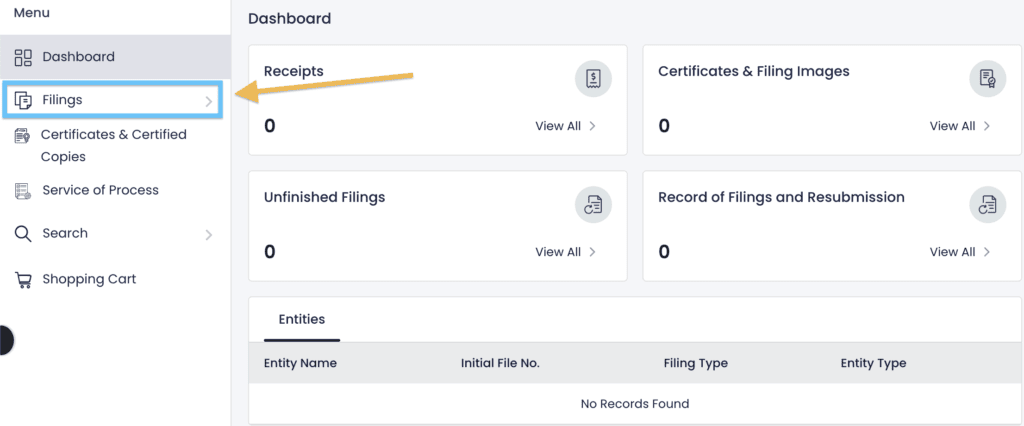
On the left, click “Filings“.
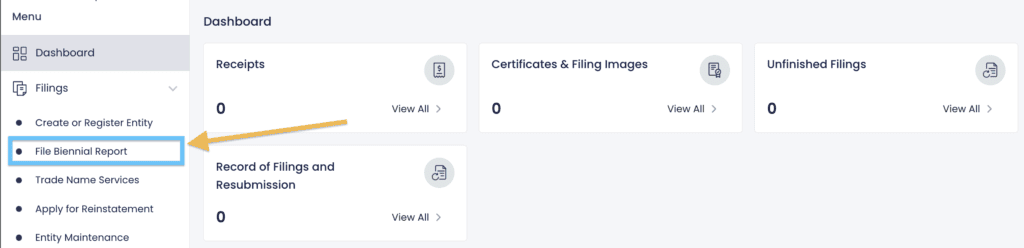
Then click “File Biennial Report“.
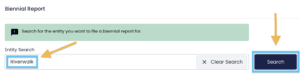
Enter the name of your LLC and click “Search“.
Select your LLC from the search results to begin your filing.
Entity Information
There’s nothing to do on the first page.
This page lists some of your LLC’s basic information and the Biennial Report filing fee.
Just click “Save and Continue“.
Purpose
This section is asking for the purpose of your LLC. And it may already be filled.
If this section isn’t filled, enter a few words or sentences about what your LLC does. It can be as simple as “Serving food in a restaurant” or “Running a daycare”.
The DCRA doesn’t allow for a general purpose/”any lawful activity” statement to be made. The statement must be specific.
When you’re done, click “Save and Continue“.
Entity Email Address
Enter your email address.
If you’d like to use the email address associated with your Access DC account, check the box next to “Same as Submitter Email“.
Then click “Save and Continue“.
Entity Phone
Enter your phone number.
Then click “Save and Continue“.
Principal Office (Street Address & Mailing Address)
Review your LLC’s Street Address and Mailing Address.
Leave them as-is or update them if your address has changed.
You can use:
- a home address,
- an office address,
- a friend or family member’s address, or
- the address of your Registered Agent Service.
These addresses can be within the District of Columbia, or in any state or any country.
Note: If you hired Northwest Registered Agent to be your Registered Agent, they’ll allow you to use their address here for privacy. This will keep your address off of public records.
When you’re done with this section, click “Save and Continue“.
Registered Agent Information
Review your DC Registered Agent information.
- If you don’t need to make updates, just click “Save and Continue“.
- If you do need to make updates, click “Edit“. You’ll see a pop-up.
To change the Registered Agent entirely:
Click “Change Agent“. Then click “Open“.
If your new Registered Agent is a Registered Agent Service:
- Click “Select Registered Agent“.
- Enter their name in the search tool and click “Search“.
- Select your new Registered Agent from the search results.
If your new Registered Agent is a person (like you, a friend, or a family member):
- Click “Create New“.
- Select whether they are an Individual or an Entity.
If they’re an Individual, enter their name, email, phone number, and street address. Then click “Save Registered Agent“.
If they’re an Entity, enter their name in the search tool and click “Search Entity“. Select your Registered Agent from the search results. Enter their email, phone number, and address. Then click “Save Registered Agent“.
Note: The Registered Agent’s address must be a physical address. PO Boxes aren’t allowed. And it must be located in DC.
To change the Registered Agent’s contact information:
Click “Change Registered Agent Information“. Then click “Open“.
Enter their email, phone number, and street address. Then click “Save Registered Agent“.
Note: If you hired a Registered Agent Service, you’ll get an error message letting you know that they’ll have to change their contact information with the state themselves.
When you’re done with the Registered Agent section, click “Save and Continue“.
Beneficial Owner Information
A Beneficial Owner is an LLC Member. In DC, Beneficial Owners are sometimes also called Governors.
Note: An LLC Manager that isn’t an LLC Member (meaning, the Manager doesn’t own any part of the company) isn’t a Beneficial Owner. Learn more here: LLC Member vs LLC Manager.
You’re required to list at least 1 Beneficial Owner in your DC Biennial Report.
If you already have LLC Beneficial Owner information in your Biennial Report, you can:
- keep it,
- remove it, or
- add more LLC Beneficial Owners (if applicable).
If you don’t need to make any changes, just click “Save and Continue“.
To edit existing Beneficial Owner information, click the edit icon to the right of the Beneficial Owner’s information and make your changes.
To delete existing Beneficial Owner information, click the delete icon to the right of the Beneficial Owner’s information.
To add a Beneficial Owner, click “Add Beneficial Owner“.
If they’re an Individual:
- Select “Individual“.
- Enter their name, email, business street address, and primary residence address. (These addresses can be in DC, or in any state, or in any country.)
- Then click “Save Beneficial Owner“.
If they’re an Entity, you can either:
- Find them in the search too by entering their name and clicking “Search Entity“.
- Select your Registered Agent from the search results and the rest of the information will auto-fill.
- Then click “Save Beneficial Owner“.
Or, you can:
- Manually enter their name, email, and street address. You can also enter a mailing address, but it isn’t required. (These addresses can be in DC, or in any state, or in any country.)
- Then click “Save Beneficial Owner“.
Review & Sign
Review the information you entered in your LLC’s Biennial Report. Check for any errors or typos.
If you need to make any changes, click the “Edit” icon for that section.
When everything looks good, check the box agreeing that the information you’ve entered is correct.
- Signature: Enter your name.
- Capacity: Enter “Authorized Person“.
- Click “+ Add“.
Then click “Add to Cart” to proceed with the payment process.
Shopping Cart
In the Shopping Cart, you’ll see your filing and the Biennial Report filing fee total.
Click “Pay Now“.
Then click “Proceed to Payment” in the pop-up.
Payment Information
Enter your name and zip code.
Then select the Credit/Debit Card option and enter your payment details.
Click “Continue” to finalize your payment ($300) and file your LLC Biennial Report with the DC Department of Licensing and Consumer Protection.
Congratulations! Your District of Columbia LLC Biennial Report has been submitted to the DLCP.
Now you just need to wait for your Biennial Report to be processed and the verification form to be uploaded to your DLCP CorpOnline account.
DC LLC Biennial Report Approval
If you file your DC LLC Biennial Report online, it will be approved instantly.
The DLCP will:
- send you an email confirmation, and
- upload a filed copy of your Biennial Report in your CorpOnline dashboard.
We recommend keeping a copy of your filed Biennial Reports with your LLC’s records.
And don’t forget: You’ll need to file your next Biennial Report in 2 years, due by April 1st. Remember to set a calendar reminder for yourself.
DLCP Contact Info
If you have any questions, you can contact the Department of Licensing and Consumer Protection at 202-671-4500 (Press 1 for Corporations Division). Or you can use their interactive chat feature on the DLCP website.
Their hours are 8:30am to 4:30pm, Monday through Friday (except Thursday, when the hours are 10:30am to 4:30pm).
Note: In 2022, the District of Columbia government reorganized some of their departments. This created the Department of Licensing and Consumer Protection, which took over handling business filings from the Department of Consumer and Regulatory Affairs. The DCRA no longer exists, so any questions about the Biennial Report should go to the DLCP.
References
DLCP: Biennial Report Form (BRA-25)
DLCP: Domestic Limited Liability Company
D.C. Code, Section 29-102.11 – Biennial Report
D.C. Regs, Section 17-703 – Deadline for Filing Biennial Report

Matt holds a Bachelor's Degree in business from Drexel University with a concentration in business law. He performs extensive research and analysis to convert state laws into simple instructions anyone can follow to form their LLC - all for free! Read more about Matt Horwitz and LLC University.
District of Columbia LLC Guide
Looking for an overview? See District of Columbia LLC
