


Washington DC LLC Formation
 In this lesson, we will walk you through starting a DC LLC by filing your Articles of Organization with Washington D.C. Department of Licensing and Consumer Protection (DLCP).
The Articles of Organization is the form that officially creates your LLC in the District of Columbia.
District of Columbia LLC Filing Fee:
The District of Columbia LLC filing is $99. This is a one-time filing fee.
How much is an LLC in DC explains all the fees you’ll pay.
Note: The “LLC filing fee” (the fee to create a District of Columbia LLC) is the same thing as the “Articles of Organization fee”. The Articles of Organization is the document that, once approved by the Corporations Division, creates your District of Columbia LLC.
LLC approval times
- If you form your District of Columbia LLC online, your LLC will be approved in 5 business days.
- If you form your District of Columbia LLC by mail, your LLC will be approved in 2-4 weeks (plus mail time).
Note: Filing times may take longer due to government delays. For the most up-to-date LLC processing times, check how long does it take to get an LLC in the District of Columbia.
Our Recommendation
We recommend filing your DC LLC online. The filing is much easier and your LLC will be approved within 5 business days (as opposed to 2-4 weeks (plus mail time) for a mail-in filing).
Need to save time? Hire a company to form your LLC:
Northwest ($39 + state fee) or LegalZoom ($149 + state fee)
(Learn why Northwest is #1 in Northwest vs LegalZoom)
Online filing instructions only
The instructions below are for how to form an LLC in the District of Columbia online.
If you prefer to file your LLC by mail, the instructions will be similar, but instead of filing online, you’ll need to mail in a completed Articles of Organization to the DLCP Corporations Division. Their mailing address is:
Department of Licensing and Consumer Protection
PO Box 92300
Washington, D.C. 20090
Send a check or money order for $99 payable to the “DC Treasurer”.
Or, you can hire a company to form your LLC instead. If you want to find the right LLC formation service for your business, check out Best LLC Services in the District of Columbia.
Prior LLC University® lessons
Before forming an LLC in the District of Columbia, make sure you have read the two prior lessons:
DC LLC Online Filing
(Access DC + CorpOnline)
In order to form an LLC online in the District of Columbia, you’ll need to create an Access DC login and then a CorpOnline account.
Create an account with Access DC and CorpOnline
- Visit the Access DC login page and click “Sign up“.
- Create a login and click the verification email. Now you can login to Access DC.
- Next, go to CorpOnline and click “Sign in with Access DC“
- Enter your address and finish the registration. You can now access the CorpOnline dashboard.
Let’s get Started
Go to your CorpOnline dashboard.
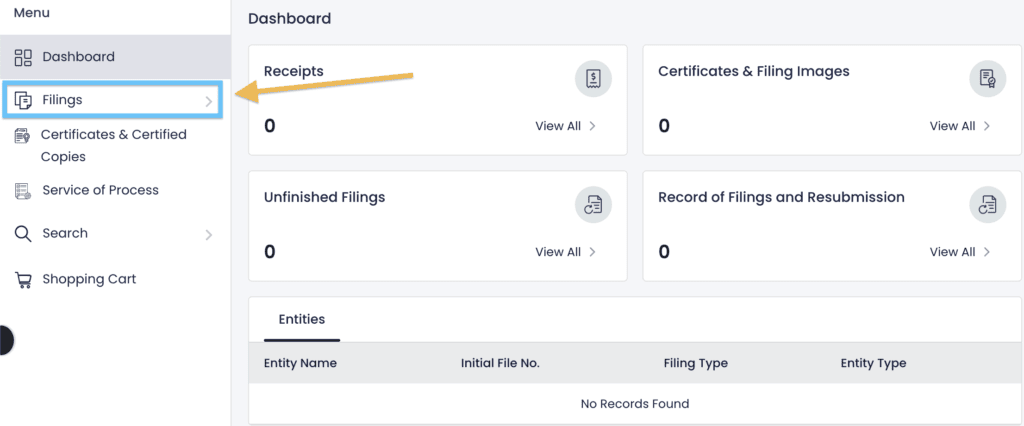
On the left, click “Filings“.
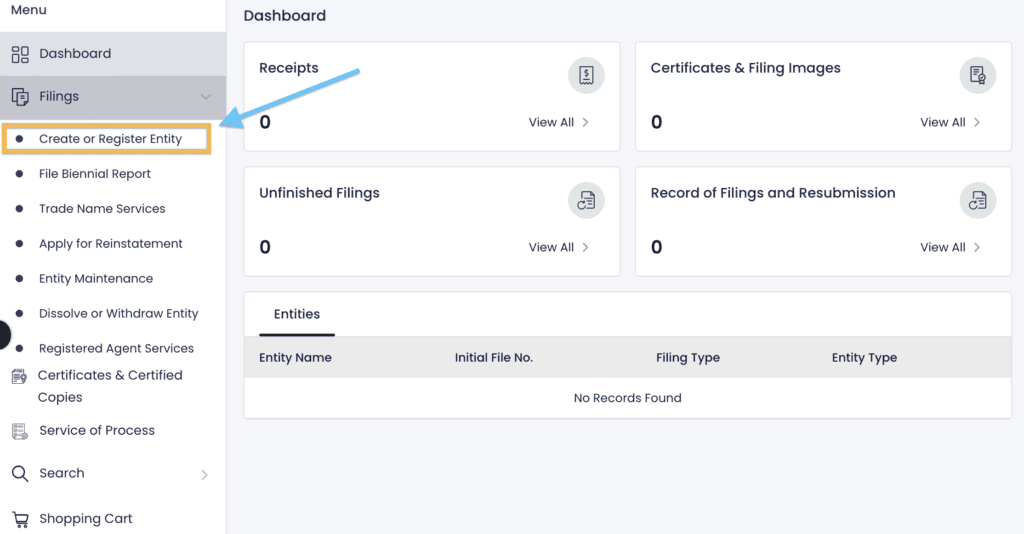
Then click “Create or Register Entity“.
Entity Type
Note: If you form an LLC in your home state, this is called a “Domestic LLC”
If you want your Domestic LLC to do business in another state, you must register that LLC in the new state. Once that LLC is registered in the new state, it is known in the new state as a “Foreign LLC“. This lesson will only cover registering a Domestic LLC.
For more information, please read What’s the Difference Between Domestic vs Foreign LLCs?
Which type of entity would you like to create?
Most people select “Domestic” to form a new LLC.
Then click “Next“.
Legal Structure
What type of entity would you like to create?
Select “Domestic Limited Liability Company“.
Then click “Next“.
Entity Name
- Prior lesson: Make sure you read the DC LLC name search lesson before proceeding.
Do you have a Name Reservation?
Select “No“.
A Name Reservation isn’t required in the District of Columbia, and we don’t recommend paying for one. It’s a waste of money.
Election Types
Skip this section.
Professional LLCs and Series LLCs are more complex and less common business structures than regular LLCs.
This lesson only covers filing a regular Domestic LLC.
What is a Professional LLC (PLLC)?
A PLLC (Professional LLC) is a type of LLC formed for the purpose of providing “professional services”.
In this case, “professional” means business types that require special permissions (like a license, registration, or certification from the state) in order to do business legally.
For example, architects, attorneys, and social work counselors, doctors, and veterinarians often form their business practices as PLLCs.
You can read more about PLLCs and their stricter requirements in: What’s a Professional LLC?
What is a Series LLC?
A Series LLC is a network of connected companies, called “cells”.
However, Series LLCs are more complex and still don’t have a lot of established case law.
Additionally, they aren’t very common. And for these reasons, we don’t cover Series LLCs at this time.
Entity Name
Enter the desired name of your LLC, but don’t type out the suffix, aka the designator (ex: “LLC”).
Instead, select your desired designator from the list in the filing:
- LLC
- L.L.C.
- Limited Company
- Limited Liability Company
Tip: Most people use “LLC”. It’s also the most recognizable and easy to remember.
Then click “Check Availability“.
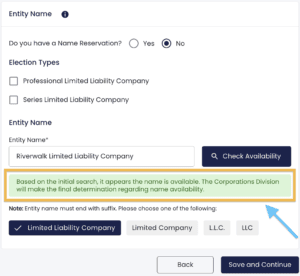
If you get a message in green saying your name is available, then your desired LLC name should be available.
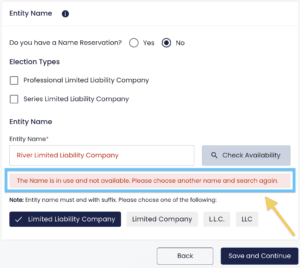
If you get a message in red saying your name isn’t available, then you’ll need to come up with a different LLC name and check on its availability.
Then click “Save and Continue“.
Entity Email
Enter your best email address.
If you want to use the email address connected to your Access DC account, check the box next to “Same as Submitter Email“.
Entity Phone
Enter your best phone number.
Effective Date
The LLC effective date is the date your DC LLC officially goes into existence.
- Select “Soonest possible date” to have your name change go into existence as soon as your filing is approved by the state.
- Select “Future effective date (5-90 days from today)” to select a different effective date.
- Then choose a date up to 90 days forward from the dropdown.
Most filers choose “Soonest possible date“.
Pro tip: If you’re forming your DC LLC later in the year, such as October, November, or December, it may be a good idea to forward-date your filing to January 1st of next year. This will save you the hassle of filing taxes for those few months.
Note: Your LLC effective date can’t be more than 90 days ahead.
Purpose
Enter your LLC Business Purpose in this section.
Don’t worry, it doesn’t have to be extremely specific and detailed, and you aren’t going to be forced to keep this business purpose forever. You can always change the purpose of your business as it grows.
You can enter just a few words (ex: “pizza shop”, “real estate investing”, “landscaping”, etc.), or a sentence or two.
Then click “Save and Continue“.
Principal Office (Street Address)
Enter your LLC’s primary office address or place of business.
This address can be:
- a home address,
- an office address,
- a friend or family member’s address, or
- the address of your Commercial Registered Agent.
This address can be within the District or it can be in another state. The address can also be outside of the United States, if applicable.
Note: If you hired Northwest Registered Agent as your DC Registered Agent, they allow you to use their address as your LLC’s business address.
Principal Office (Mailing Address)
If you’d like to use the Principal Office street address as the mailing address, check the box next to “Same as Principal Office (Street Address)“.
If you’d like to use a different mailing address, enter that here.
Then click “Save and Continue“.
Registered Agent Information
- Prior lesson: Make sure you’ve read District of Columbia Registered Agent before proceeding.
If you or someone you know will be the Registered Agent for your LLC:
- Select “Create New“.
- Enter the person’s name, email, phone number, and DC street address.
- Click “Save Registered Agent“.
If you hired a Registered Agent Service:
- Select “Existing Registered Agent“.
- Enter your Registered Agent Service’s name and click “Search“.
- Select your Registered Agent Service from the search results by scrolling to the right and clicking “Select“.
Note: If you hired Northwest Registered Agent, you’ll notice their name is in the list twice. It doesn’t matter which one you select. They are both the same.
When you’re finished with this section, click “Save and Continue“.
Beneficial Owner Information
A Beneficial Owner is an LLC Member. In DC, Beneficial Owners are sometimes also called Governors.
Note: An LLC Manager that isn’t an LLC Member (meaning, the Manager doesn’t own any part of the company) isn’t a Beneficial Owner. Learn more here: LLC Member vs LLC Manager.
You’re required to list at least 1 Beneficial Owner, but you can list more if you want to.
Most people just list one of the LLC Members.
To add a Beneficial Owner, click “Add Beneficial Owner“.
If the Beneficial Owner is a person:
- Select “Individual“.
- Enter the person’s name, email, Entity Address, and Primary Residence address.
- Click “Save Beneficial Owner“.
If the Beneficial Owner is a business entity:
- Select “Entity“.
- Enter the Entity Name and click “Search Entity” to auto-fill the information if the entity is already on file with the DC Corporations Division.
- Otherwise, enter the Entity Name, Beneficial Owner’s Email, and Street Address.
- If you’d like to also include a Mailing Address (optional), enter that information as well.
- Click “Save Beneficial Owner“.
Then click “Save and Continue“.
Organizer Information
- Related articles: LLC Organizer vs Member and Registered Agent vs LLC Organizer
Your LLC only needs one Organizer. Whoever is the Organizer for your LLC can later sign a Statement of LLC Organizer.
Most people forming their own LLC are also the LLC Organizer.
If the Organizer is a person:
- Select “Individual“.
- Enter the person’s name and address.
- Click “Save Organizer“.
If the Organizer is a business entity:
- Select “Entity“.
- Enter the Entity Name and click “Search Entity“.
- Find your Entity in the search results, then click “Select” to auto-fill the information if the entity is already on file with the DC Corporations Division.
- Otherwise, enter the entity’s name and address.
- If you’d like to also include a Mailing Address (optional), enter that information as well.
- Click “Save Organizer“.
Then click “Save and Continue“.
Miscellaneous Provisions (Members must be added)
- Related article: Member-managed vs Manager-managed LLC
As per Section 29-102.01(6) of the Code of DC, you need to list the Members (or Managers, if applicable) of your LLC.
If your LLC is Member-managed:
- you must list every Member that owns more than 10% of the LLC
If your LLC is Manager-managed:
- you must list every Manager
- and you must list every Member that owns more than 10% of the LLC
For every person listed, you must include their:
- first and last name,
- residential address, and
- business address.
Here’s an example for someone who has a residence address and separate a business address:
Bob Jones
701 Pennsylvania Ave #7012, Washington, DC 20004 (residence)
201 F St NE, Washington, DC 20002 (business)
Here’s an example for someone who doesn’t have a dedicated business address:
Sally Smith
1350 Maryland Ave NE, Washington, DC 20002 (residence and business)
This section is used to add additional provisions, articles, or rules to your DC LLC filing. You can upload multiple pages or multiple addenda to your LLC filing.
Tip: Most filers don’t upload any additional documents unless directed to by their attorney.
Click “Save and Continue“.
Review & Sign
On this page, review all the information you’ve entered and check for any typos.
If you need to make any changes, click the edit icon in the upper right of each section.
When everything looks good, check the boxes agreeing that you understand you’ll need to file a Biennial Report every 2 years, and that your filing is true and accurate.
- Signature: Enter the name of the person filing the document.
- Capacity: Enter “Authorized Person“.
- Then click “Add“.
Expedite Service Options
Choose your filing timeline:
Normal approval time for filing a DC LLC online is 5 business days (at no additional cost).
If you’d like to speed up your LLC approval time, you can expedite the review of your filing:
- $50 extra for 3 business days
- $100 extra for 1 business day
Most people select “Standard (est. 5 business days) – $0“.
From the drop down, select whether or not you want to expedite your LLC filing.
Then click “Add to Cart” to proceed.
Shopping Cart
This page just shows your total filing fee.
Click “Pay Now“.
You’ll see a pop-up letting you know that you’ll be transferred to a secure payment site to finish your filing.
Click “Proceed to Payment“.
Enter Payment Information
Enter your name and zip code.
Then select the Credit/Debit Card option and enter your payment details.
Click “Continue” to submit your filing and payment to the DLCP.
Congratulations, your District of Columbia LLC filing has been submitted to the DLCP!
Now you just need to wait for your LLC to be approved.
District of Columbia LLC Approval
After submitting your District of Columbia LLC Articles of Organization online, the DLCP will approve your LLC in 5 business days (unless you’ve paid extra for an expedited review).
Once your DC LLC is approved, you’ll receive an email notification and you’ll then be able to download your LLC approval documents from your CorpOnline account.
There are 3 documents that make up your District of Columbia LLC approval:
- Certificate of Organization (with the DLCP seal)
- Articles of Organization (stamped and approved)
- Invoice
DLCP Contact Info
If you have any questions, you can contact the Department of Licensing and Consumer Protection at 202-671-4500 (Press 2 for Corporations Division). Or you can use their interactive chat feature on the DLCP website.
Their hours are 8:30am to 4:30pm, Monday through Friday (except Thursday, where the hours are 10:30am to 4:30pm).
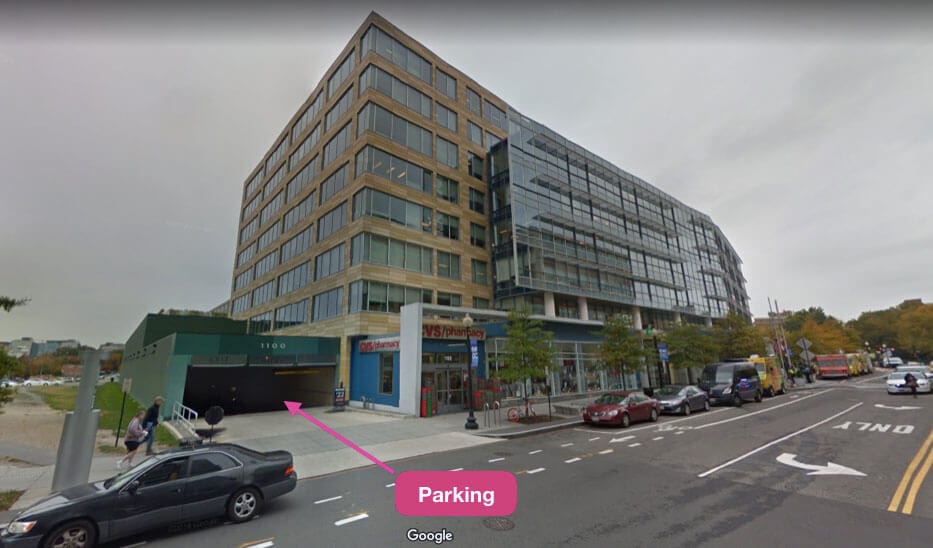
(Washington DC Department of Licensing and Consumer Protection Building)
Search your domain name
If you plan on building a website, you can quickly register your domain name. Creating a website with your business name as the domain name can help people find your business online. You can easily search and purchase a domain name through GoDaddy.
Find a domain name
References
DLCP: Business Registration FAQs
DLCP: Limited Liability Company Forms
DC Municipal Regulations: Section 17-708
DLCP: Domestic Limited Liability Company
DLCP: Domestic LLC Articles of Organization
DLCP: Fees for Corporate Registration Services
Code of DC: Chapter 8 (Limited Liability Companies)

Matt holds a Bachelor's Degree in business from Drexel University with a concentration in business law. He performs extensive research and analysis to convert state laws into simple instructions anyone can follow to form their LLC - all for free! Read more about Matt Horwitz and LLC University.
District of Columbia LLC Guide
Looking for an overview? See District of Columbia LLC

Hi Matt! Thanks for this great site – you have saved a lot of lives! Just one question: I have already registered one LLC in DC, and now I’m trying to register another LLC in DC, too. But at the first step “Do you already have a registered organization, in DC or any other jurisdiction, that you use to do business?”, I think I should click “Yes” because I do have a registered LLC in DC already. Then, they just turned me to file my annual report for my existing LLC and there is no option for registering a new one. So, does it mean that for people who want to register multiple LLCs in DC, we actually should click “No” for “Do you already have a registered organization, in DC or any other jurisdiction, that you use to do business?”?
Hey Travis! You’re very welcome! Thanks for the kind words. Yeah, that’s pretty annoying/confusing lol. Yes, you can just click “No”, and the proceed to set up your 2nd LLC. Hope that helps.